Component
- 코드 재사용을 위해 각 단위를 독립적으로 구성하는 것
Vue.component( '컴포넌트명', 내용)Vue.component( 'todo-item', {
template: '<li>오늘의 할 일</li>'
});<ul>
<todo-item></todo-item>
</ul>
05_component.html
<!DOCTYPE html>
<html>
<head>
    <title>Vue.js Components</title>
    <script src="https://cdn.jsdelivr.net/npm/vue/dist/vue.js"></script>
</head>
<body>
    <h1>Vue.js Components</h1>
    <hr>
    <div id="comp">
        <ul>
            <todo-item
                v-for="cook in cookList"
                :key="cook.id"
                v-bind:todo="cook"
            >
            </todo-item>
        </ul>
        <ul>
            <drink-menu
                v-for="drink in drinkList"
                :key="drink.id"
                v-bind:drink="drink"
            >
            </drink-menu>
        </ul>
    </div>

    <script>
        // todo-item 컴포넌트 정의
        Vue.component('todo-item', {
            props: ['todo'],
            template: '<li>오늘의 할 일 {{ todo.id + 1 }} 번째 : {{ todo.food }}</li>'
        });

        // drink-menu 컴포넌트 정의
        Vue.component('drink-menu', {
            props: ['drink'],
            template: '<li>{{ drink.id + 1 }} : {{ drink.food }}</li>'
        });

        // 단일 Vue 인스턴스 정의
        new Vue({
            el: '#comp',
            data: {
                cookList: [
                    { id: 0, food: 'Ramen' },
                    { id: 1, food: 'IceCream' },
                    { id: 2, food: 'Sandwich' },
                    { id: 3, food: 'Chicken' },
                    { id: 4, food: 'Wine' }
                ],
                drinkList: [
                    { id: 0, food: 'Water' },
                    { id: 1, food: 'Cola' },
                    { id: 2, food: 'Sprite' },
                    { id: 3, food: 'Wine' }
                ]
            }
        });
    </script>
</body>
</html>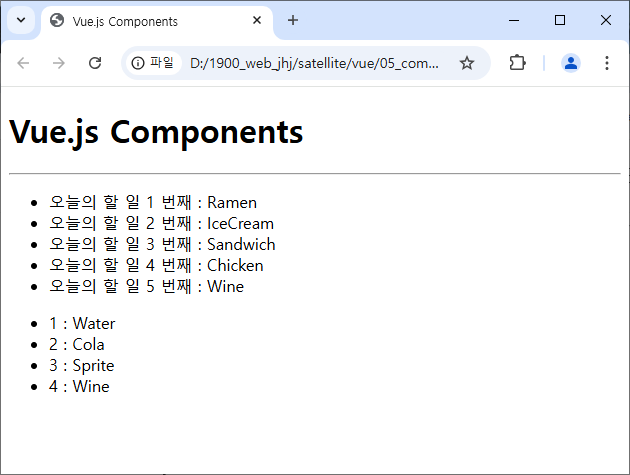
'자바 공부 > [자바] 기본 공부' 카테고리의 다른 글
| [Vue.js] class 속성 변경하기 (0) | 2024.12.04 |
|---|---|
| [Vue.js] Methods, computed, watch (0) | 2024.12.03 |
| [Vue.js] v-문법 (0) | 2024.11.28 |
| [Node.js 2일차] http 모듈 (2) | 2024.11.28 |
| [Node.js 2일차] 이벤트 처리 함수 (0) | 2024.11.28 |