자바 공부/[자바] 기본 공부
[Vue.js] class 속성 변경하기
햅2024
2024. 12. 4. 19:48
1. class 속성 변경하기
- class 속성의 특징: 여러 개의 클래스를 중복해서 적용 가능
v-bind:class = { 클래스명: 값, 클래스명2: 값2 }<!DOCTYPE html>
<html>
<head>
<title>Class ON/OFF</title>
<style>
.redfont{
color:red;
}
.boldfont{
font-weight: bold;
}
.bigfont{
font-size: 48px;
}
</style>
</head>
<script src="https://cdn.jsdelivr.net/npm/vue/dist/vue.js"></script>
<body>
<div id="app8">
<p v-bind:class="titleOne">Title One</p>
</div>
</body>
<script>
var app8 = new Vue({
el: '#app8',
data: {
titleOne: 'bigfont boldfont'
}
});
</script>
</html>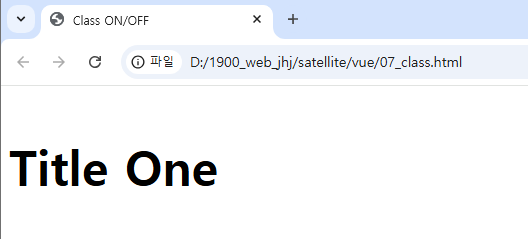
<!DOCTYPE html>
<html>
<head>
    <title>Class ON/OFF</title>
    <style>
        .redfont{
            color:red;
        }
        .boldfont{
            font-weight: bold;
        }
        .bigfont{
            font-size: 48px;
        }
    </style>
</head>
<script src="https://cdn.jsdelivr.net/npm/vue/dist/vue.js"></script>
<body>
    <div id="app8">
        <p v-bind:class="{redfont:ron, boldfont:bon, bigfont:bion }">TEXT</p>
        <p v-bind:class="{redfont:3 > 5, boldfont: 3 < 5 ? true:false, bigfont:'a' != 'a' }">ABC</p>
    </div>
</body>
<script>
    var app8 = new Vue({
        el: '#app8',
        data: {
            ron: true,
            bon: false,
            bion: true
        }
    });
</script>
</html>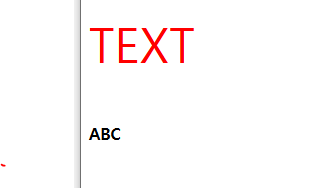
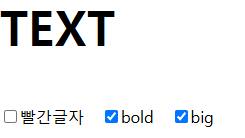
체크박스와 스타일링을 v-model을 통해 바인딩 하는 법.
<body>
<div id="app8">
<p v-bind:class="{redfont:ron, boldfont:bon, bigfont:bion }">TEXT</p>
<input type="checkbox" v-model="ron">빨간글자
<input type="checkbox" v-model="bon">bold
<input type="checkbox" v-model="bion">big
</div>
</body>
<script>
var app8 = new Vue({
el: '#app8',
data: {
ron: true,
bon: false,
bion: true
}
});
</script>

computed를 통해 다른 컴포넌트가 바뀔 때 자기 자신도 바꾸게 하는 법
<body>
<div id="app8">
<p v-bind:class="{redfont:ron, boldfont:bon, bigfont:bion }">TEXT</p>
<input type="checkbox" v-model="ron">빨간글자
<input type="checkbox" v-model="bon">bold
<input type="checkbox" v-model="bion">big
<p v-bind:class="textcolor">I am a student</p>
</div>
</body>
<script>
var app8 = new Vue({
el: '#app8',
data: {
ron: true,
bon: false,
bion: true
},
computed: {
textcolor:function(){
console.log("color change");
if(this.ron == true){
return 'redfont';
}
else{
return null;
}
}
}
});
</script>
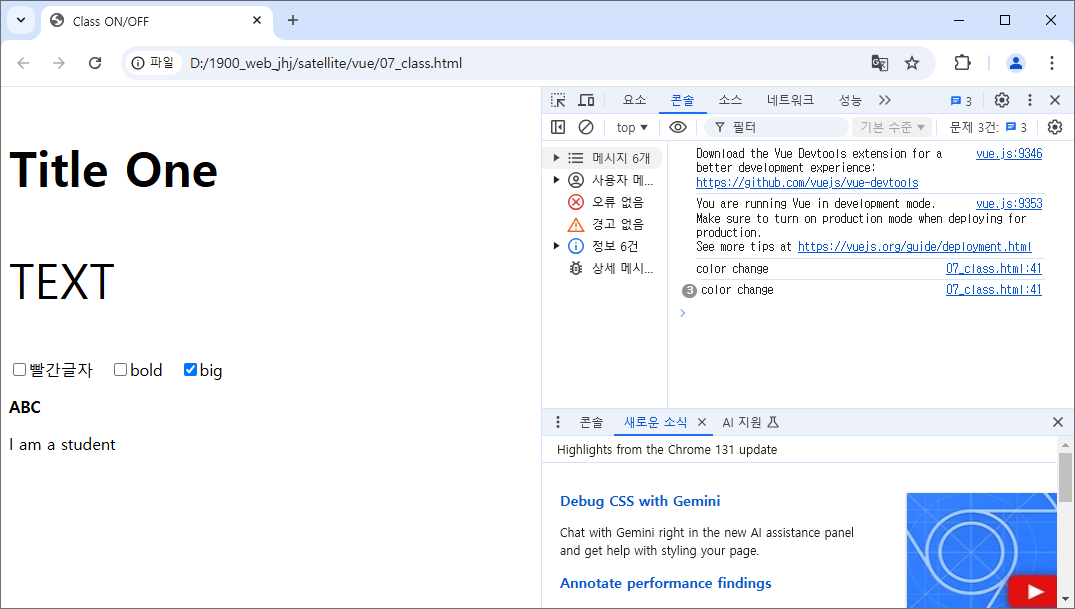
07_class.html
<!DOCTYPE html>
<html>
<head>
<title>Class ON/OFF</title>
<style>
.redfont{
color:red;
}
.boldfont{
font-weight: bold;
}
.bigfont{
font-size: 48px;
}
</style>
</head>
<script src="https://cdn.jsdelivr.net/npm/vue/dist/vue.js"></script>
<body>
<div id="app8">
<p v-bind:class="titleOne">Title One</p>
<p v-bind:class="{redfont:ron, boldfont:bon, bigfont:bion }">TEXT</p>
<input type="checkbox" v-model="ron">빨간글자
<input type="checkbox" v-model="bon">bold
<input type="checkbox" v-model="bion">big
<p v-bind:class="{redfont:3 > 5, boldfont: 3 < 5 ? true:false, bigfont:'a' != 'a' }">ABC</p>
<p v-bind:class="textcolor">I am a student</p>
</div>
</body>
<script>
var app8 = new Vue({
el: '#app8',
data: {
titleOne: 'bigfont boldfont',
ron: true,
bon: false,
bion: true
},
computed: {
textcolor:function(){
console.log("color change");
if(this.ron == true){
return 'redfont';
}
else{
return null;
}
}
}
});
</script>
</html>